Monday, June 9, 2014

Sunday, June 1, 2014

GIT 1 - Final Spread
Recreate the magazine layout from this picture. Call it "5 Things I Learned About Print"

On the right side there are 8 white boxes. Inside each box, define each of the following terms like you would see in a dictionary. You may need to look them up at dictionary.com or wikipedia.org.
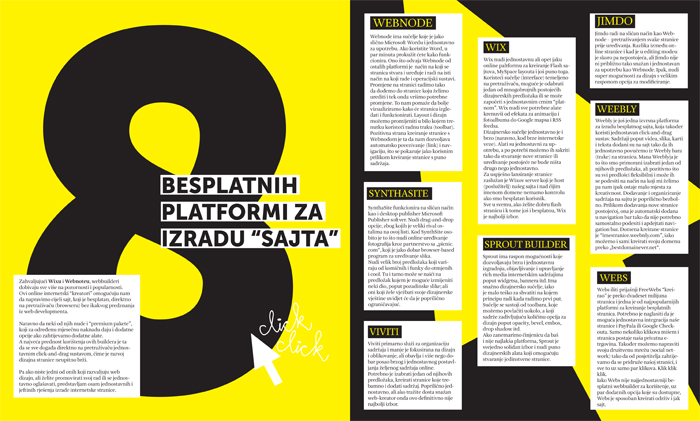
On the right side there are 8 white boxes. Inside each box, define each of the following terms like you would see in a dictionary. You may need to look them up at dictionary.com or wikipedia.org.
- Bleed
- Margin
- Gutter
- Drop Cap
- CMYK
Tuesday, May 27, 2014
GDL 2 - Scratch Games
Complete the basic "Getting Started" tutorial for Scratch - http://scratch.mit.edu/projects/editor/?tip_bar=getStarted. Create an account to save your work.
Scratch is a free game engine made by MIT. It is designed as an introduction to coding. The thought process is the same, but it utilizes puzzle pieces that only fit in certain ways, so you can focus on the concepts instead of syntax.
Create your own games in groups of up to 4. Utilize the skills you have gained this semester to create game characters and backgrounds. Be sure to visit the "Explore" link at the top of the Scratch homepage. You may remix an existing game, but all visuals must be original work
Grading Objectives
Scratch is a free game engine made by MIT. It is designed as an introduction to coding. The thought process is the same, but it utilizes puzzle pieces that only fit in certain ways, so you can focus on the concepts instead of syntax.
Create your own games in groups of up to 4. Utilize the skills you have gained this semester to create game characters and backgrounds. Be sure to visit the "Explore" link at the top of the Scratch homepage. You may remix an existing game, but all visuals must be original work
Grading Objectives
- Characters created in Adobe Illustrator
- Background created in Adobe Illustrator
- Complete game
GDL 1 - Vintage Poster
DUE: Friday, May 30th

Create a vintage poster with your favorite event or party, like graduation. The tutorial uses a go kart, but you may choose any subject and pull an image from google. You may choose any paper texture, try lostandtaken.com. Follow the Chris Spooner tutorial here.
This tutorial will be a demonstration of the combined power of Photoshop and Illustrator.
File >> Save for Web... and upload your finished project to your blogger for grading.
GRADE ELEMENTS:

Create a vintage poster with your favorite event or party, like graduation. The tutorial uses a go kart, but you may choose any subject and pull an image from google. You may choose any paper texture, try lostandtaken.com. Follow the Chris Spooner tutorial here.
This tutorial will be a demonstration of the combined power of Photoshop and Illustrator.
File >> Save for Web... and upload your finished project to your blogger for grading.
GRADE ELEMENTS:
- Page layout built with Shapes and Pathfinder
- Text layout
- Proper page proportions (ie Portrait)
- Adding texture with Opacity Blend Modes
- Photo cutting and editing
GRADING:
Students will be graded on the quality of lines and the ability to utilize the tutorial tools.
LINKS:
http://blog.spoongraphics.co.uk/tutorials/how-to-create-a-retro-style-race-poster-in-photoshopMonday, May 19, 2014
GDL 2 - Portfolio Website
Use TextEdit to create a webpage to display your artwork. Use the following markup as your template. Change the variable 'page_url' to match your blogger address. Make sure you keep the quotation marks.
Setup your Google Drive to host your website: https://support.google.com/drive/answer/2881970?hl=en
Be sure to save your html files with as .html and stylesheets as .css
Create a logo, header and footer sections with a separate color, a background color, and a font from google web fonts.
REQUIRED ELEMENTS:
RESOURCES:
https://www.google.com/fonts
http://www.w3schools.com/html/default.asp
https://support.google.com/drive/answer/2881970?hl=en
<!DOCTYPE html>
<html>
<head>
<script src="https://code.jquery.com/jquery-1.10.2.min.js"></script>
<script>
$(document).ready(function() {
// CHANGE THIS TO YOUR SITE URL
var page_url = "http://learngdl.blogspot.com";
// START - DON'T CHANGE THIS CODE!!!
$('#gallery').load("http://crispycatfish.com/school/imageScrapper.php?_url=" + page_url );
}); //document.ready
// END - DON'T CHANGE THIS CODE!!!
</script>
</head>
<body>
<div id="gallery">
</div>
</body>
</html>
Setup your Google Drive to host your website: https://support.google.com/drive/answer/2881970?hl=en
Be sure to save your html files with as .html and stylesheets as .css
Create a logo, header and footer sections with a separate color, a background color, and a font from google web fonts.
REQUIRED ELEMENTS:
- Valid HTML - http://validator.w3.org/
- <DIV> tags for all of the following:
- Header
- Footer
- Content
- Navigation/Sidebar
- At least 3 images
- Use of at least 3 different HEX colors - http://colorschemedesigner.com/
- At least 3 of the following tags
- <p>
- <ul>
- <ol>
- <h1> ... <h6>
- <a>
- <br>
- <b>
- Valid CSS including at least 3 of the following:
- border
- background
- color
- width
- height
- float
- box-shadow
RESOURCES:
https://www.google.com/fonts
http://www.w3schools.com/html/default.asp
https://support.google.com/drive/answer/2881970?hl=en
<!DOCTYPE html>
<html>
<head>
<script src="https://code.jquery.com/jquery-1.10.2.min.js"></script>
<script>
$(document).ready(function() {
// CHANGE THIS TO YOUR SITE URL
var page_url = "http://learngdl.blogspot.com";
// START - DON'T CHANGE THIS CODE!!!
$('#gallery').load("http://crispycatfish.com/school/imageScrapper.php?_url=" + page_url );
}); //document.ready
// END - DON'T CHANGE THIS CODE!!!
</script>
</head>
<body>
<div id="gallery">
</div>
</body>
</html>
GDL 2 - HTML+ CSS Quiz
Complete this QUIZ
Answer all questions. If you don't know an answer, guess. Once you hit submit, your quiz is recorded. You will not have the opportunity to change answers.
https://docs.google.com/forms/d/1OyxlwGN7uaUvAnPLEhu_N1G1qEYE6WW9gpPY-ylFm54/viewform?usp=send_form
Answer all questions. If you don't know an answer, guess. Once you hit submit, your quiz is recorded. You will not have the opportunity to change answers.
https://docs.google.com/forms/d/1OyxlwGN7uaUvAnPLEhu_N1G1qEYE6WW9gpPY-ylFm54/viewform?usp=send_form
Thursday, May 15, 2014
Wednesday, May 7, 2014
GDL 2 - HTML

Web design is one of the larger segments of the graphic design field. It is a good idea for all designers to understand at least the basics of web design, since their work will most likely end up online. Additionally, most designers use online portfolios to show off their talents and self promote.
Pair up in groups of 2. No groups of 3. Only 1 computer should be on for each group to ensure the internet connections are fast enough. Let me know immediately if you are having an issue with your connection. This will not be an excuse for lack of project completion. No late work will be accepted.
Sign up for an account at codecademy.com. Work together to complete the HTML & CSS course. When you have completed it, show me the results page. On Monday, I will be grading you and your partner based on the completion of the course . If the results page shows that you have completed 68%, your grade will both receive 68% for the assignment. This assignment is worth 50 points. If you need to work on this outside of school, do it.
GRADING:
- 50 points
- Percentage of course completion = grade
LINKS:
codecademy.com
Tuesday, May 6, 2014
GDL 2 - Web Design Wireframing
Read through the linked material to learn about wireframing. The basic idea of wireframing is to create a website design plan focusing on the structure without being distracted by color.
Blogger has a basic setup that you will likely not want to change too much. However, you still have option for logo design and placement, how pictures will flow on the page, and where to put your navigation.
Create a 3 paper wireframes of your new site design. Circle your favorite and create it on Illustrator at 960px W * 768px H. Then choose at least 2 color schemes and create 3 color site mockups. Notate each artboard with your reason for choosing your colors. Finish your design with a new logo.
Your Illustrator file should include (on separate artboards)....
Blogger has a basic setup that you will likely not want to change too much. However, you still have option for logo design and placement, how pictures will flow on the page, and where to put your navigation.
Create a 3 paper wireframes of your new site design. Circle your favorite and create it on Illustrator at 960px W * 768px H. Then choose at least 2 color schemes and create 3 color site mockups. Notate each artboard with your reason for choosing your colors. Finish your design with a new logo.
Your Illustrator file should include (on separate artboards)....
- 1 B&W wireframe mockup
- At least 2 color schemes
- 3 or more color site mockups
- Artboard notation
- New logo
LINKS:
GDL 1 - Fox Illustration
DUE: Thursday, May 8th
Use a variety of simple shapes combined with warping effects to create a cartoon fox. Be sure to complete the tutorial including strawberries, flowers and dotted background.
Grading Objectives
Use a variety of simple shapes combined with warping effects to create a cartoon fox. Be sure to complete the tutorial including strawberries, flowers and dotted background.
Grading Objectives
- Use of shapes
- Use of Warp Effects
- Completion of all tutorial elements
LINKS:
Monday, May 5, 2014
GIT 1 - Writing an Article
Look through the links to learn about how to write an article for a magazine. Here is a suggested outline from Scholastic...
The Basic Story OutlineThe best way to structure a newspaper article is to first write an outline.
Review your research and notes. Then jot down ideas for the following six sections. Remember, this is just a foundation upon which to build your story!
I. Lead sentenceGrab and hook your reader right away!
II. IntroductionWhich facts and figures will ground your story? You have to tell your readers where and when this story is happening.
III. Opening quotation What will give the reader a sense of the people involved and what they are thinking?
IV. Main bodyWhat is at the heart of your story?
V. Closing quotationFind something that sums the article up in a few words.
VI. Conclusion (optional—the closing quote may do the job)
What is a memorable way to end your story? The end quote is a good way to sum things up. That doesn’t always work. If you are quoting more than one person with different points of view in your story, you cannot end with a quote from just one of them. Giving one of your interviewees the last word can tilt the story in their favor.
LINKS:
http://www.scholastic.com/teachers/article/writing-your-article
http://www.dailywritingtips.com/writing-for-magazines/
http://www.thepenmagazine.net/20-steps-to-write-a-good-article/
http://business.tutsplus.com/articles/the-15-step-freelance-writers-guide-to-writing-for-magazines--fsw-28445
Tuesday, April 29, 2014

Monday, April 28, 2014
GIT 1 - Superman Spread
Create a spread for Superman based on this image:

You MUST include the following in your design:


You MUST include the following in your design:
- Place a photo on the left of the caped crusader
- Create a title over the image
- Create several text wraps
- Copy DC's wiki for your body text
MY EXAMPLE:
RESOURCES:

GDL 2 - Pixel Animations

Create a full animation in Photoshop with characters created in Illustrator. You may reuse characters you have already made.
Your animation must include:
- 3 unique characters
- Detailed background
- At least 5 separate movements / tweens
GRADING OBJECTIVES
- NO Strokes
- NO Grid Lines
- Smooth motion / tweens
- GIF creation
LINKS:
Additional Resources -
GDL 1 - Pixel Art Characters
Create 3 pixel art characters using the linked tutorial. Be sure to use the grid as shown in the tutorial. You may recreate the same characters from the tutorial or use your own. Characters must be complex for full credit, PAC MAN IS NOT ALLOWED.

GRADING OBJECTIVES:

GRADING OBJECTIVES:
- Complex pixel art characters
- Use of grid
- NO stroke or grid lines
LINKS:
Friday, April 25, 2014
GIT 1 - Design Challenge - Red Riding Hood Spread
Create a spread for Red Riding Hood based on this image:

You MUST include the following in your design:

Little Red Cap promised to obey her mother. The grandmother lived out in the woods, a half hour from the village. When Little Red Cap entered the woods a wolf came up to her. She did not know what a wicked animal he was, and was not afraid of him.
"Good day to you, Little Red Cap."
"Thank you, wolf."
"Where are you going so early, Little Red Cap?"
"To grandmother's."
"And what are you carrying under your apron?"
"Grandmother is sick and weak, and I am taking her some cake and wine. We baked yesterday, and they should give her strength."
"Little Red Cap, just where does your grandmother live?"
"Her house is a good quarter hour from here in the woods, under the three large oak trees. There's a hedge of hazel bushes there. You must know the place," said Little Red Cap.
The wolf thought to himself, "Now there is a tasty bite for me. Just how are you going to catch her?" Then he said, "Listen, Little Red Cap, haven't you seen the beautiful flowers that are blossoming in the woods? Why don't you go and take a look? And I don't believe you can hear how beautifully the birds are singing. You are walking along as though you were on your way to school in the village. It is very beautiful in the woods."
Little Red Cap opened her eyes and saw the sunlight breaking through the trees and how the ground was covered with beautiful flowers. She thought, "If a take a bouquet to grandmother, she will be very pleased. Anyway, it is still early, and I'll be home on time." And she ran off into the woods looking for flowers. Each time she picked one she thought that she could see an even more beautiful one a little way off, and she ran after it, going further and further into the woods. But the wolf ran straight to the grandmother's house and knocked on the door.
"Who's there?"
"Little Red Cap. I'm bringing you some cake and wine. Open the door for me."
"Just press the latch," called out the grandmother. "I'm too weak to get up."
The wolf pressed the latch, and the door opened. He stepped inside, went straight to the grandmother's bed, and ate her up. Then he took her clothes, put them on, and put her cap on his head. He got into her bed and pulled the curtains shut.
Little Red Cap had run after flowers, and did not continue on her way to grandmother's until she had gathered all that she could carry. When she arrived, she found, to her surprise, that the door was open. She walked into the parlor, and everything looked so strange that she thought, "Oh, my God, why am I so afraid? I usually like it at grandmother's." Then she went to the bed and pulled back the curtains. Grandmother was lying there with her cap pulled down over her face and looking very strange.
"Oh, grandmother, what big ears you have!"
"All the better to hear you with."
"Oh, grandmother, what big eyes you have!"
"All the better to see you with."
"Oh, grandmother, what big hands you have!"
"All the better to grab you with!"
"Oh, grandmother, what a horribly big mouth you have!"
"All the better to eat you with!" And with that he jumped out of bed, jumped on top of poor Little Red Cap, and ate her up. As soon as the wolf had finished this tasty bite, he climbed back into bed, fell asleep, and began to snore very loudly.
A huntsman was just passing by. He thought it strange that the old woman was snoring so loudly, so he decided to take a look. He stepped inside, and in the bed there lay the wolf that he had been hunting for such a long time. "He has eaten the grandmother, but perhaps she still can be saved. I won't shoot him," thought the huntsman. So he took a pair of scissors and cut open his belly.
He had cut only a few strokes when he saw the red cap shining through. He cut a little more, and the girl jumped out and cried, "Oh, I was so frightened! It was so dark inside the wolf's body!"
And then the grandmother came out alive as well. Then Little Red Cap fetched some large heavy stones. They filled the wolf's body with them, and when he woke up and tried to run away, the stones were so heavy that he fell down dead.
The three of them were happy. The huntsman took the wolf's pelt. The grandmother ate the cake and drank the wine that Little Red Cap had brought. And Little Red Cap thought to herself, "As long as I live, I will never leave the path and run off into the woods by myself if mother tells me not to."
They also tell how Little Red Cap was taking some baked things to her grandmother another time, when another wolf spoke to her and wanted her to leave the path. But Little Red Cap took care and went straight to grandmother's. She told her that she had seen the wolf, and that he had wished her a good day, but had stared at her in a wicked manner. "If we hadn't been on a public road, he would have eaten me up," she said.
"Come," said the grandmother. "Let's lock the door, so he can't get in."
Soon afterward the wolf knocked on the door and called out, "Open up, grandmother. It's Little Red Cap, and I'm bringing you some baked things."
They remained silent, and did not open the door. The wicked one walked around the house several times, and finally jumped onto the roof. He wanted to wait until Little Red Cap went home that evening, then follow her and eat her up in the darkness. But the grandmother saw what he was up to. There was a large stone trough in front of the house.
"Fetch a bucket, Little Red Cap," she said. "Yesterday I cooked some sausage. Carry the water that I boiled them with to the trough." Little Red Cap carried water until the large, large trough was clear full. The smell of sausage arose into the wolf's nose. He sniffed and looked down, stretching his neck so long that he could no longer hold himself, and he began to slide. He slid off the roof, fell into the trough, and drowned. And Little Red Cap returned home happily and safely.

You MUST include the following in your design:
- Use a photo on the left of Red Riding Hood
- Create a title
- Create a drop cap
- Copy Grimm's tale for your body text
- Use RED instead of yellow for title and drop cap
- Use WHITE for body text
- Use a dark grey/charcoal background
RESOURCES:
Once upon a time there was a sweet little girl. Everyone who saw her liked her, but most of all her grandmother, who did not know what to give the child next. Once she gave her a little cap made of red velvet. Because it suited her so well, and she wanted to wear it all the time, she came to be known as Little Red Cap.
One day her mother said to her, "Come Little Red Cap. Here is a piece of cake and a bottle of wine. Take them to your grandmother. She is sick and weak, and they will do her well. Mind your manners and give her my greetings. Behave yourself on the way, and do not leave the path, or you might fall down and break the glass, and then there will be nothing for your sick grandmother."Little Red Cap promised to obey her mother. The grandmother lived out in the woods, a half hour from the village. When Little Red Cap entered the woods a wolf came up to her. She did not know what a wicked animal he was, and was not afraid of him.
"Good day to you, Little Red Cap."
"Thank you, wolf."
"Where are you going so early, Little Red Cap?"
"To grandmother's."
"And what are you carrying under your apron?"
"Grandmother is sick and weak, and I am taking her some cake and wine. We baked yesterday, and they should give her strength."
"Little Red Cap, just where does your grandmother live?"
"Her house is a good quarter hour from here in the woods, under the three large oak trees. There's a hedge of hazel bushes there. You must know the place," said Little Red Cap.
The wolf thought to himself, "Now there is a tasty bite for me. Just how are you going to catch her?" Then he said, "Listen, Little Red Cap, haven't you seen the beautiful flowers that are blossoming in the woods? Why don't you go and take a look? And I don't believe you can hear how beautifully the birds are singing. You are walking along as though you were on your way to school in the village. It is very beautiful in the woods."
Little Red Cap opened her eyes and saw the sunlight breaking through the trees and how the ground was covered with beautiful flowers. She thought, "If a take a bouquet to grandmother, she will be very pleased. Anyway, it is still early, and I'll be home on time." And she ran off into the woods looking for flowers. Each time she picked one she thought that she could see an even more beautiful one a little way off, and she ran after it, going further and further into the woods. But the wolf ran straight to the grandmother's house and knocked on the door.
"Who's there?"
"Little Red Cap. I'm bringing you some cake and wine. Open the door for me."
"Just press the latch," called out the grandmother. "I'm too weak to get up."
The wolf pressed the latch, and the door opened. He stepped inside, went straight to the grandmother's bed, and ate her up. Then he took her clothes, put them on, and put her cap on his head. He got into her bed and pulled the curtains shut.
Little Red Cap had run after flowers, and did not continue on her way to grandmother's until she had gathered all that she could carry. When she arrived, she found, to her surprise, that the door was open. She walked into the parlor, and everything looked so strange that she thought, "Oh, my God, why am I so afraid? I usually like it at grandmother's." Then she went to the bed and pulled back the curtains. Grandmother was lying there with her cap pulled down over her face and looking very strange.
"Oh, grandmother, what big ears you have!"
"All the better to hear you with."
"Oh, grandmother, what big eyes you have!"
"All the better to see you with."
"Oh, grandmother, what big hands you have!"
"All the better to grab you with!"
"Oh, grandmother, what a horribly big mouth you have!"
"All the better to eat you with!" And with that he jumped out of bed, jumped on top of poor Little Red Cap, and ate her up. As soon as the wolf had finished this tasty bite, he climbed back into bed, fell asleep, and began to snore very loudly.
A huntsman was just passing by. He thought it strange that the old woman was snoring so loudly, so he decided to take a look. He stepped inside, and in the bed there lay the wolf that he had been hunting for such a long time. "He has eaten the grandmother, but perhaps she still can be saved. I won't shoot him," thought the huntsman. So he took a pair of scissors and cut open his belly.
He had cut only a few strokes when he saw the red cap shining through. He cut a little more, and the girl jumped out and cried, "Oh, I was so frightened! It was so dark inside the wolf's body!"
And then the grandmother came out alive as well. Then Little Red Cap fetched some large heavy stones. They filled the wolf's body with them, and when he woke up and tried to run away, the stones were so heavy that he fell down dead.
The three of them were happy. The huntsman took the wolf's pelt. The grandmother ate the cake and drank the wine that Little Red Cap had brought. And Little Red Cap thought to herself, "As long as I live, I will never leave the path and run off into the woods by myself if mother tells me not to."
They also tell how Little Red Cap was taking some baked things to her grandmother another time, when another wolf spoke to her and wanted her to leave the path. But Little Red Cap took care and went straight to grandmother's. She told her that she had seen the wolf, and that he had wished her a good day, but had stared at her in a wicked manner. "If we hadn't been on a public road, he would have eaten me up," she said.
"Come," said the grandmother. "Let's lock the door, so he can't get in."
Soon afterward the wolf knocked on the door and called out, "Open up, grandmother. It's Little Red Cap, and I'm bringing you some baked things."
They remained silent, and did not open the door. The wicked one walked around the house several times, and finally jumped onto the roof. He wanted to wait until Little Red Cap went home that evening, then follow her and eat her up in the darkness. But the grandmother saw what he was up to. There was a large stone trough in front of the house.
"Fetch a bucket, Little Red Cap," she said. "Yesterday I cooked some sausage. Carry the water that I boiled them with to the trough." Little Red Cap carried water until the large, large trough was clear full. The smell of sausage arose into the wolf's nose. He sniffed and looked down, stretching his neck so long that he could no longer hold himself, and he began to slide. He slid off the roof, fell into the trough, and drowned. And Little Red Cap returned home happily and safely.
Wednesday, April 23, 2014
GDL 2 - Animated GIF Rocket

GRADING OBJECTIVES
- Smooth tweening
- Complete animation looping
- Proper file type
LINKS:

Tuesday, April 22, 2014
GDL 2 - Illustrator Animation
Create a couple basic flash animations in Adobe Illustrator by following the tutorial. Pay close attention and use your layers panel ( Window >> Layers ). Post your finished .swf file to blogger.
Grading Objectives:
Grading Objectives:
- Create 2 working animations
- Animations flow smoothly
- Artwork is done well
Links:
Monday, April 21, 2014
GIT 1 - Fairy Tale Page
Follow along with the tutorial to create the first page of a fairy tale book using Adobe Illustrator. Post to blogger when you are finished.
GRADING OBJECTIVES:
LINKS:
http://design.tutsplus.com/tutorials/create-the-first-page-of-a-fairy-tale-story-book-with-a-hint-of-kitsch--vector-1122
GRADING OBJECTIVES:
- Use of grid
- Use of Text Wrap
- Creating a Drop Cap
- Creation of all tutorial elements (castle, owl, tree)
- Use of texture
LINKS:
http://design.tutsplus.com/tutorials/create-the-first-page-of-a-fairy-tale-story-book-with-a-hint-of-kitsch--vector-1122
Subscribe to:
Posts (Atom)